


Choosing between an LED and LCD monitor can feel confusing. The terms are often used interchangeably, even though they are not the same.
Many buyers assume one is a completely different display technology. In reality, the difference is more specific and often misunderstood.
If you are deciding which monitor is better for gaming, office work, or daily use, the real performance gaps matter. This guide explains the real difference between them, how they work, and which option makes more sense for your needs.
What is an LCD monitor?
LCD stands for Liquid Crystal Display. It is the panel technology that forms images on your screen.
The panel uses liquid crystals sandwiched between two glass layers. When electricity flows through them, the crystals shift to either block or allow light to pass through each pixel.
An LCD panel does not produce its own light. It relies on a backlight to make the image visible.
Older LCD monitors used CCFL (cold cathode fluorescent lamp) tubes for backlighting. These tubes were bulkier, generated more heat, and required more power, which made monitors thicker and less energy-efficient.
What is an LED monitor?
An LED monitor is an LCD monitor that uses LED (light-emitting diode) backlighting instead of older CCFL (cold cathode fluorescent lamp) tubes. The panel technology remains LCD.
LEDs are compact, energy-efficient light sources that produce less heat. This allows monitors to be thinner, lighter, and longer-lasting.
All LED monitors are LCD monitors. The difference lies in the backlight used behind the panel.
What is the Difference Between LCD and LED?
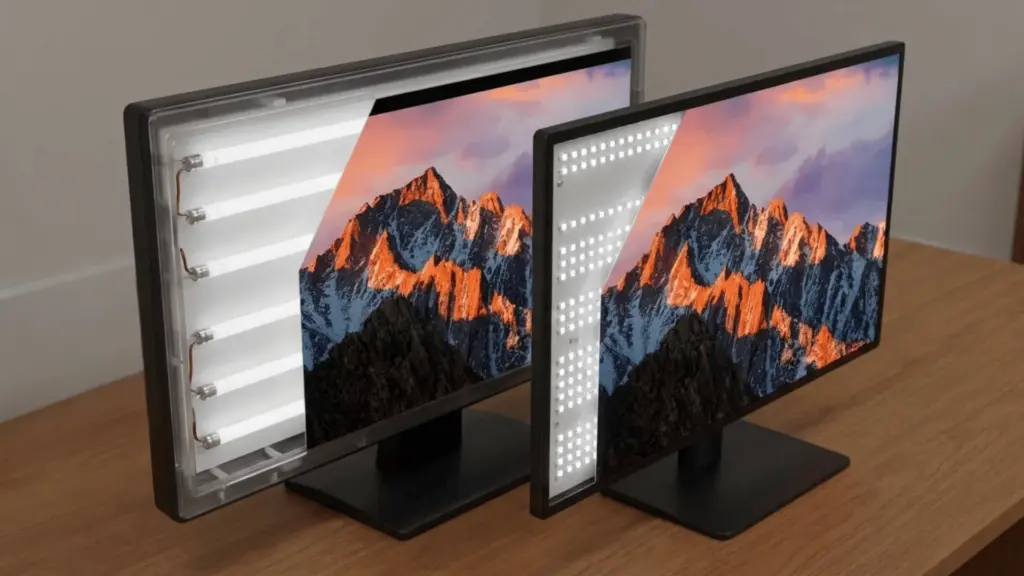
The difference comes down to backlighting.
CCFL-lit LCD monitors use fluorescent tubes as their light source. These tubes are bulkier and generate more heat, which leads to thicker designs and higher power consumption.
LED-backlit LCD monitors use small solid-state diodes for illumination. Because they produce less heat and take up less space, they enable thinner monitors with lower energy use and longer lifespan.
The image creation process remains the same. Only the lighting method behind the panel changes.
| Feature | CCFL LCD Monitor | LED-Backlit LCD Monitor |
|---|---|---|
| Backlighting | Fluorescent tubes (CCFL) | Light-emitting diodes |
| Energy Efficiency | Moderate | 20–30% lower power use |
| Lifespan | 30,000–60,000 hours | 50,000–100,000 hours |
| Thickness | Thicker | Thinner and lighter |
| Contrast | Limited black depth | Better contrast (especially full-array) |
| Brightness | Moderate | Higher peak brightness |
| Local Dimming | Not available | Available in full-array models |
| Heat Output | Higher | Lower |
| Price | Usually cheaper | Slightly higher |
Most modern monitors use LED backlighting. In real-world use, panel type (TN, IPS, VA), refresh rate, and build quality often impact performance more than the backlight alone.
How Backlighting Affects Picture Quality
Backlighting plays a direct role in how contrast, brightness, and dark scenes appear on your screen. While the LCD panel forms the image, the quality of the light behind it determines how deep blacks look and how vivid highlights appear.
Contrast and Black Levels
Full-array LED backlighting places LEDs across the entire screen and supports local dimming. This means certain sections of the screen can dim independently while others stay bright. The result is deeper blacks and stronger contrast in dark scenes.
CCFL backlighting illuminates the entire screen evenly at all times. Because it cannot dim specific areas, black areas often look gray, especially in dark rooms.
Edge-lit LEDs are placed along the edges of the display and spread the light inward. While it improves efficiency and thinness, dimming precision is limited compared to full-array systems.
Low-cost edge-lit LED monitors may show little noticeable improvement in black depth compared to older CCFL models.
Brightness and Uniformity
LED backlighting can reach higher peak brightness levels than older CCFL systems. This improves visibility in bright rooms and enhances highlights in HDR content.
Full-array LED distributes light across the entire panel, which improves consistency from corner to corner. This reduces bright spots and dark patches.
Edge-lit designs place LEDs along the frame and spread the light inward. If the diffusion layer is weak, this can cause uneven brightness or light bleed near the edges.
Color Accuracy
The backlight influences how wide a color range the monitor can display. Stronger and more stable lighting can help expand the visible color gamut.
However, panel type plays a larger role in overall color performance. IPS panels typically deliver better color accuracy and consistency than TN panels, regardless of whether the backlight is LED or CCFL.
LED backlighting alone does not guarantee better color accuracy. Panel technology and calibration have a greater impact on true color performance.
Energy Efficiency and Lifespan Differences
Energy efficiency and durability affect long-term ownership cost. The difference comes from how each backlight generates light.
CCFL uses gas discharge inside fluorescent tubes to produce illumination. This creates more heat, which increases internal wear over time.
LED uses solid-state semiconductor diodes to emit light. Because it generates less heat, it reduces thermal stress on components.
Lower heat output means lower power consumption and longer lifespan. In most cases, LED monitors last longer and cost less to run over time.
Cost Variances
| Cost Factor | CCFL LCD Monitor | LED-Backlit LCD Monitor |
|---|---|---|
| Upfront Price | Usually Cheaper | Slightly Higher |
| Market Availability | Limited (older/clearance Stock) | Widely Available |
| Warranty Support | May Be Limited | Typically Standard Coverage |
| Energy Consumption | Higher Power Usage | Lower Power Usage |
| Long-Term Electricity Cost | Higher Over Time | Lower Over Time |
| Replacement Risk | Shorter Lifespan Increases Risk | Longer Lifespan Reduces Risk |
| Overall value | Budget-Friendly Short-Term | Better Long-Term value |
Bottom Line: If the price difference is small, LED offers better overall value. If the gap is large and usage is basic, a cheaper CCFL option may still be practical.
Why Panel Type Matters More Than LED vs. LCD?
Panel type has a bigger impact on real-world performance than backlight type. Pixel alignment controls motion clarity, viewing angles, and color stability.
TN Panels
- Fastest response times (often ~1ms)
- Ideal for competitive and fast-paced gaming
- Narrow viewing angles
- Weaker color reproduction and contrast
IPS Panels
- Wide viewing angles (up to ~178°)
- Strong color accuracy and consistency
- Good for design, media, and general use
- Slightly slower response times than TN
VA Panels
- Strong contrast ratios and deeper blacks
- Balanced overall performance
- Better color depth than TN
- Moderate response times
Note: Pixel alignment determines motion blur, color shift, and stability across viewing angles. These factors influence image quality more than LED vs. CCFL backlighting.
LED vs. LCD Based on Usage
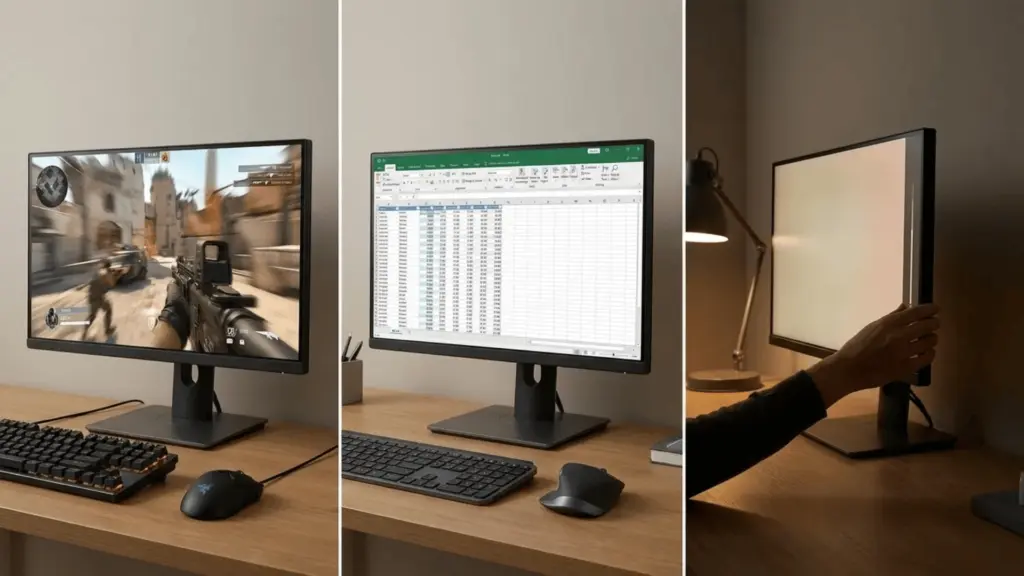
Your ideal choice depends on how you plan to use the monitor. Performance needs change between gaming, office work, and long viewing sessions.
Which is Better for Gaming?
For gaming, the better choice depends on what type of games you play. Backlight type matters, but panel type and refresh rate often matter more.
Competitive Gaming
Competitive gaming requires a focus on low response time and high refresh rates such as 144 Hz or 240 Hz. TN panels are often chosen because they can deliver response times of around 1 ms.
In fast-paced esports titles, motion clarity and low input lag are more important than achieving deep contrast. The type of backlight used becomes less important in these scenarios.
If you play competitive FPS games, speed should always be your main priority. In this case, panel performance matters more than the difference between LED and CCFL.
Immersive or HDR Gaming
Immersive or HDR gaming benefits from full-array LED backlighting because it improves contrast, especially in darker scenes. This helps create a more realistic and visually rich experience.
Local dimming further enhances image quality by allowing deeper blacks and brighter highlights on the same screen. This makes shadows look more detailed and bright areas pop without washing out.
Higher peak brightness improves HDR performance by revealing more detail in both bright and dark areas. IPS or VA panels also help by delivering better color depth and wider viewing angles.
When LED matters: HDR gaming, dark environments, and story-driven or visually rich games where contrast and brightness enhance detail.
When it does not: Budget esports setups focused purely on refresh rate and response time.
Which is Better for Office Work and General Use?
For office tasks like spreadsheets, emails, and web browsing, the difference between LED and older CCFL backlighting is usually minor. Both can handle everyday productivity without noticeable image quality gaps.
Panel type matters more in shared workspaces. IPS panels offer wider viewing angles, so colors and brightness remain consistent across different viewing positions.
Ergonomics and brightness control often impact comfort more than backlight type. Adjustable height, tilt, and proper brightness settings play a bigger role in reducing strain during extended use.
Which is Better for Eye Comfort?
When people ask which is better for the eyes, they are usually concerned about strain, fatigue, and long hours of use. Backlight type matters, but settings and features matter more.
Flicker and Brightness Control
LED backlighting provides more precise brightness control than older CCFL systems. Better dimming control helps match screen brightness to room lighting.
Many modern monitors also include flicker-free technology. This reduces PWM (pulse-width modulation) flicker, which can contribute to eye strain over extended use.
Blue Light Reduction
Most newer monitors offer low-blue-light modes or “reader” settings. These reduce high-energy blue light that can cause discomfort during long sessions.
However, eye comfort depends more on proper brightness, contrast, and viewing distance than on LED vs. CCFL alone.
Failure case: Even a high-end LED monitor can strain the eyes if the brightness is set too high or the screen is positioned incorrectly.
When to Choose CCFL LCD vs. LED: Final Buying Guide
If you are narrowing down your choice, use this structured guide to make a clear selection.
When a CCFL LCD Monitor Still Makes Sense
In limited situations, a CCFL LCD monitor can still be practical:
- Lower upfront cost compared to LED models
- Suitable for light-duty tasks like browsing or document work
- Acceptable as a secondary or backup monitor
It is significantly cheaper; choose it if your performance needs are minimal.
When to Choose an LED Monitor
LED is the stronger choice in most modern setups:
- Better energy efficiency for long daily usage
- Longer lifespan with lower replacement risk
- Stronger contrast, especially with full-array dimming
What to Prioritize Beyond Backlight
Regardless of LED or CCFL, focus on these factors first:
- Panel type (TN, IPS, VA) for gaming speed and color performance
- Refresh rate for smooth motion
- Brightness control and ergonomics for comfort
If the price difference is small, LED offers better long-term value. If your budget is tight and usage is basic, a cheaper CCFL option can still meet your needs.
Wrapping Up
Choosing between an LED vs. LCD monitor becomes easier once you understand what truly separates them. The difference lies in backlighting, while panel type, refresh rate, and brightness control shape real-world performance.
You now know when LED offers better energy efficiency and contrast, and when panel technology matters more than the label. That clarity helps you avoid marketing confusion and focus on what fits your usage.
Before making your final choice, compare panel type, refresh rate, brightness levels, and long-term value. Pick the monitor that matches how you actually use your screen.
Frequently Asked Questions
Is LED the same as OLED?
No. LED monitors are LCD panels with LED backlighting, while OLED displays use self-lit pixels that do not require a backlight. OLED is a different display technology.
Can you still buy CCFL LCD monitors today?
They are rare in the modern market. Most new monitors use LED backlighting, and CCFL models are typically older stock or budget leftovers.
Do LED monitors last longer than LCD monitors?
LED-backlit LCD monitors typically last longer than CCFL-lit LCD models because LED diodes experience less thermal wear over time.