




Not knowing your exact phone model can make a simple task surprisingly annoying. If you are asking, “what phone do I have?”, the answer is usually hiding in a few easy-to-check places.
You may need the model for a case, repair, trade-in, software update, or support question. I prefer starting with Settings because it gives the clearest details without extra tools.
You can also use the model number, IMEI, original box, or account information if Settings is not enough.
Here, I explain how to identify an iPhone or Android phone, what each device number means, and which method works best when your phone will not turn on.
What Information Identifies Your Phone?
Several names and numbers can appear when you check your phone details. They serve different purposes, so knowing what each one means can help you find the information you actually need.
The model name is the familiar product name, such as iPhone 16, Samsung Galaxy S25, or Google Pixel 9. If you’re still deciding between generations, a latest iPhone model can help you see how naming and specs line up before you check your own device.
A model number identifies a model, regional variant, or hardware version of a phone. Phones sold under the same product name may use different model numbers depending on the market or carrier.
The serial number identifies your individual device.
The IMEI, or International Mobile Equipment Identity, uniquely identifies an individual cellular device on mobile networks.
For buying accessories, arranging repairs, or checking compatibility, the model name and model number are usually the most useful details.
How to Check What Phone You Have in Settings
Settings is usually the fastest place to check when your phone is working. The menu names vary slightly between Apple and Android manufacturers.
Find Your iPhone Model
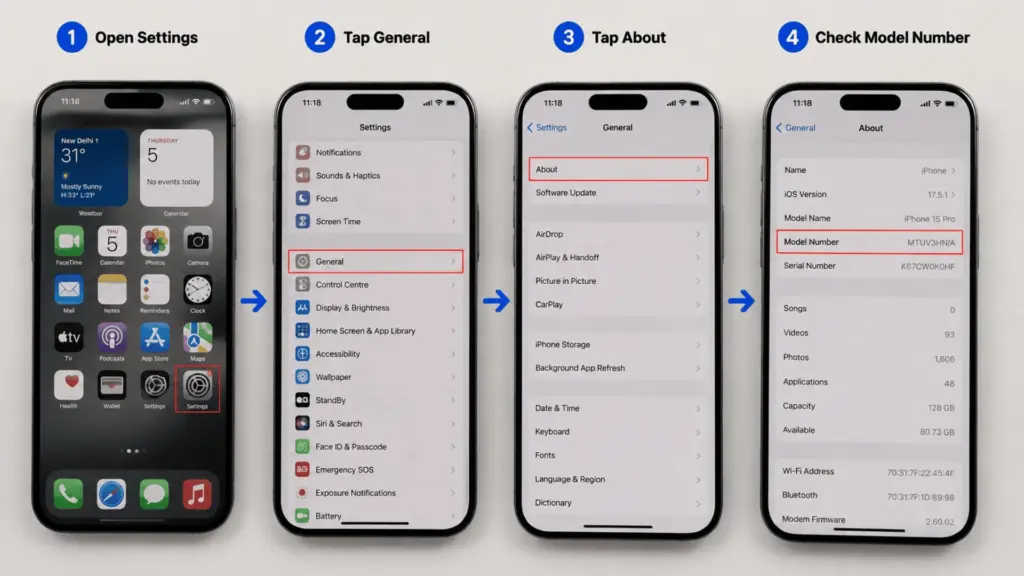
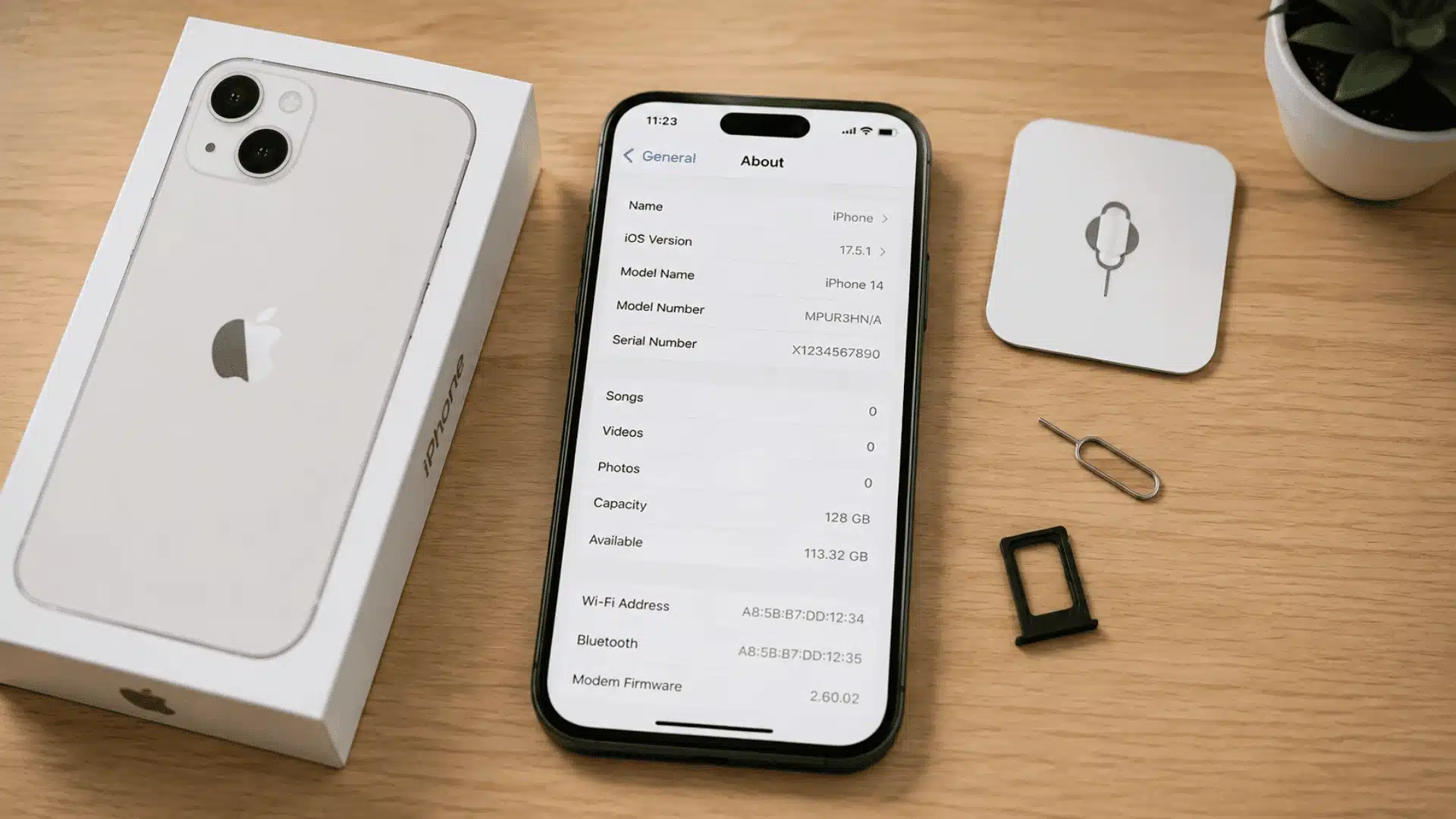
On an iPhone, open: Settings > General > About
Look for Model Name. This normally tells you the iPhone model or generation.
You can also find Model Number on the same screen. Apple may initially display a part number, which can look something like MY.../A.
Tap that number once to reveal the technical model number beginning with A, such as A3081.
You can then compare that code with Apple’s official iPhone identification information to confirm the model.
The About page also includes details such as the serial number, iOS version, storage capacity, and IMEI.
Find Your Android Phone Model
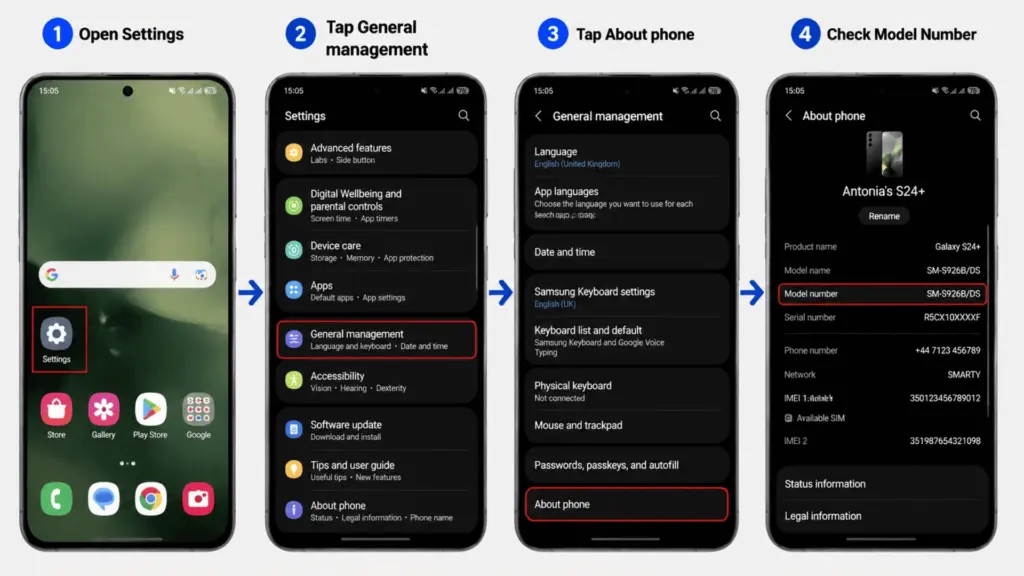
Most Android phones place device information under: Settings > About Phone
Some Android versions may place it under: Settings > System > About Phone
Look for labels such as:
- Device name
- Model
- Model name
- Model number
The wording and location can differ between Google, Samsung, Motorola, Xiaomi, OnePlus, and other Android manufacturers.
If the familiar product name is missing, copy the complete model number and check it against the manufacturer’s official support information.
Find Your Samsung Phone Model
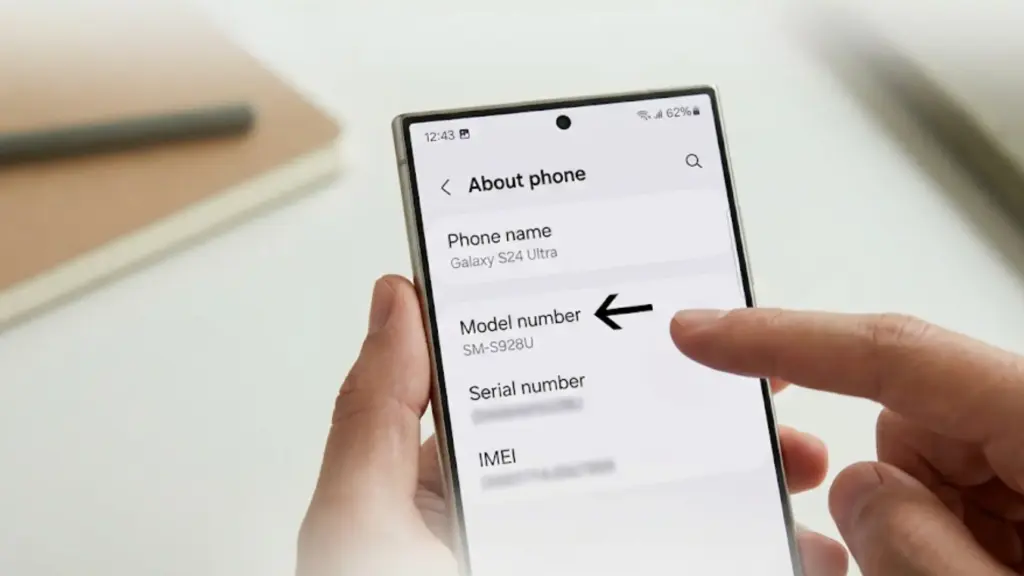
Samsung phones usually list their main identification details in one place. Open: Settings > About Phone
You may see the product name, model number, serial number, and IMEI. Samsung model numbers commonly begin with SM-, followed by letters and numbers.
For example: SM-S928U
These codes can help separate regional, carrier, or hardware versions that share the same Galaxy product name. For context on how these differences show up in real use, a recent Galaxy Ultra specs across similar model numbers
Samsung also provides instructions for checking these details through its official support page.
Use the complete model number when confirming your device rather than relying on only part of the code.
Find Your Google Pixel Model
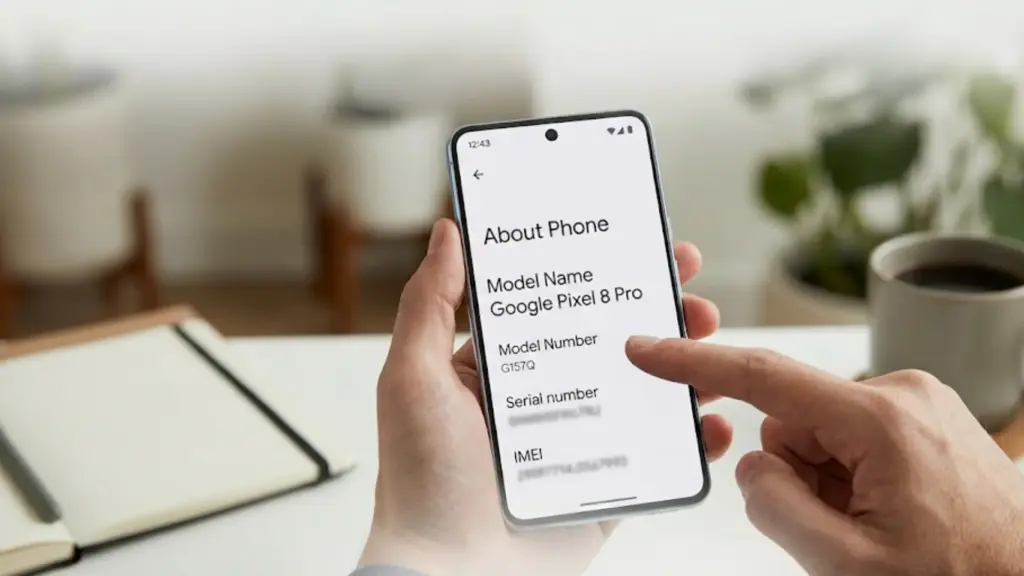
On a Google Pixel, start with: Settings > About Phone
Depending on the Android version, more information may appear under the device details.
Look for the model name and related hardware information. Google also explains how to locate model and IMEI details through its device support information.
I prefer noting both the model name and model number. That gives you a stronger reference when checking repairs, accessories, or device compatibility.
How to Identify Your Phone Using the Model Number
A model number can provide a more precise answer when a product name is missing or when several phone versions share a similar name.
You may find the model number in several places:
- Settings: Check About Phone or the device information page.
- Original Box: Look at the product label near the barcode.
- Purchase Receipt: Retailer or carrier receipts may include the model code.
- Carrier Account: Your account may list device details linked to the mobile line.
- Manufacturer Account: A linked device page may display model information.
- Device Markings: Some phones place identification details on the casing or near the SIM tray.
Once you have the code, check the complete model number on the manufacturer’s official support or identification page.
For example: Samsung SM-S928U
Using the full code matters because similar devices can have closely related model numbers.
Regional and carrier versions may also differ in network support, SIM configuration, or other hardware details even when the main product name is the same.
Can You Identify Your Phone With the IMEI Number?
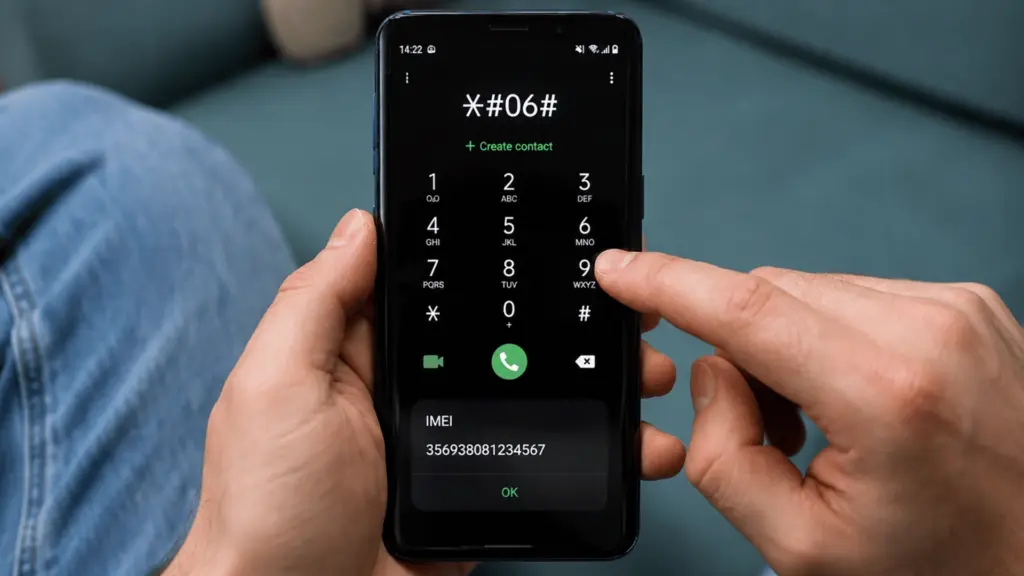
The IMEI is another important device identifier.
An IMEI is usually a 15-digit number assigned to an individual cellular device. A dual-SIM phone may display two numbers, commonly labeled IMEI 1 and IMEI 2.
On many phones, open the Phone app and enter: *#06#
The IMEI may appear automatically. However, this code does not work on every phone or network.
You may also find the IMEI in:
- Settings
- The original phone box
- A carrier account
- Manufacturer device information
The IMEI serves a different purpose from the model number. A model number identifies a phone model or variant, while the IMEI identifies an individual cellular device.
The initial portion of an IMEI is known as the TAC, or Type Allocation Code. It can provide information about the device make and model. The full IMEI identifies the individual device.
For precise confirmation, carrier and manufacturer systems are better choices than random third-party IMEI lookup sites. The GSMA IMEI database provides more information about how IMEI and TAC identification work.
Avoid posting your full IMEI on forums, social media, or unknown websites. Share it only when a trusted carrier, manufacturer, insurer, repair provider, or resale service has a valid reason to request it.
How to Tell What Phone You Have Without Turning It On
A dead battery, damaged display, or faulty phone can make the Settings method impossible. Physical records and linked accounts may still help identify the model.
- Original Box: The label may include the model name, model number, storage capacity, serial number, and IMEI.
- Purchase Receipt: Retailer invoices and carrier orders often contain the product name or model information.
- Phone Exterior: Some older phones have identification details printed on the back casing or beneath a removable battery.
- SIM Tray: Certain devices include a small model code near or inside the SIM tray, but this is not standard across all phones.
- Carrier Account: Your account page may show a device associated with the mobile line.
- Manufacturer Account: Apple, Samsung, or Google account pages may show devices linked to the account.
Account information needs a little caution. A listed phone may be a device that was connected previously rather than the handset currently in your hand.
Confirm account details against the original box, receipt, Settings page, or model number whenever possible.
Can a Website Automatically Tell What Phone You Have?
Some websites try to identify your phone from information sent by the browser.
They may read details such as:
- Operating system
- Browser version
- Screen characteristics
- General device information
This can sometimes help identify a phone family, but getting the precise model is not guaranteed.
Modern browsers limit the amount of hardware information websites can access. Two closely related phones may also provide nearly identical browser data.
For that reason, an automatic phone detector is better treated as a clue rather than final confirmation.
Checking Settings or matching the full model number against an official manufacturer page gives you a more dependable result.
Why Knowing Your Exact Phone Model Matters
Knowing the correct model can prevent compatibility problems and save time when dealing with repairs, support, accessories, or resale.
- Cases and Protectors: Similar phones may have different dimensions, button positions, or camera openings.
- Repair Parts: Batteries, displays, cameras, charging ports, and internal parts can vary between models.
- Software Support: Update availability often depends on the phone generation and manufacturer support period.
- Trade-In Pricing: Model, storage capacity, condition, and regional version can affect the value of a device.
- Network Compatibility: Regional models may support different cellular frequencies or SIM configurations.
- Technical Support: Providing the correct model helps support staff give instructions that match your device.
A small difference in a model number can matter, especially when you are ordering a case, screen, battery, or replacement part.
What to Do After You Find Your Phone Model
Once you confirm the phone, save the basic details that are useful for future reference.
Record:
- Exact model name
- Model number
- Storage capacity
- Current operating system version
These details can help with accessory shopping, software checks, resale listings, repair requests, and technical support.
Avoid storing or sharing the IMEI unnecessarily. Keep it only where a trusted carrier, manufacturer, insurer, or resale service requires it.
The same caution applies to your serial number.
If you take a screenshot of the About page, keep it private. That screen may contain information you would not want to post publicly.
Final Thoughts
Finding your exact phone model is easier once you know where to check and which details matter. Settings is usually the fastest option, while the model number gives you a more precise way to confirm the device.
If your phone does not turn on, the box, receipt, carrier account, or manufacturer account can still help. The IMEI may also identify the device, but I recommend keeping that number private.
Knowing the answer to “what phone do I have?” makes it easier to buy compatible accessories, arrange repairs, check updates, and compare trade-in offers.
I suggest saving your model name and number somewhere safe, then try these checks on your phone today.
Frequently Asked Questions
How Do I Tell What Model iPhone I Have?
Open Settings, tap General, then select About. The Model Name section shows your exact iPhone version, such as iPhone 14 or iPhone 15 Pro Max. The model number is also listed separately on the same page.
How Do I Tell What Model Of Samsung Phone I Have?
Open Settings, scroll down, and tap About Phone. Look for the Model Number or Product Name section. Samsung Galaxy phones usually show this information in the same area, but menu names may vary slightly depending on the software version.
What Is My Phone’s IMEI And How Do I Find It?
The IMEI is a unique 15-digit number that identifies your specific phone on cellular networks. Dial *#06# on your phone keypad to display it. You can use this number with an IMEI lookup service to confirm your phone model and specifications.
Can I Find Out My Phone Model Without Turning It On?
Yes, you can check the original box or packaging label, which usually includes the phone model name and number. If the box is unavailable, inspect the phone’s back panel for printed model details or regulatory information.