

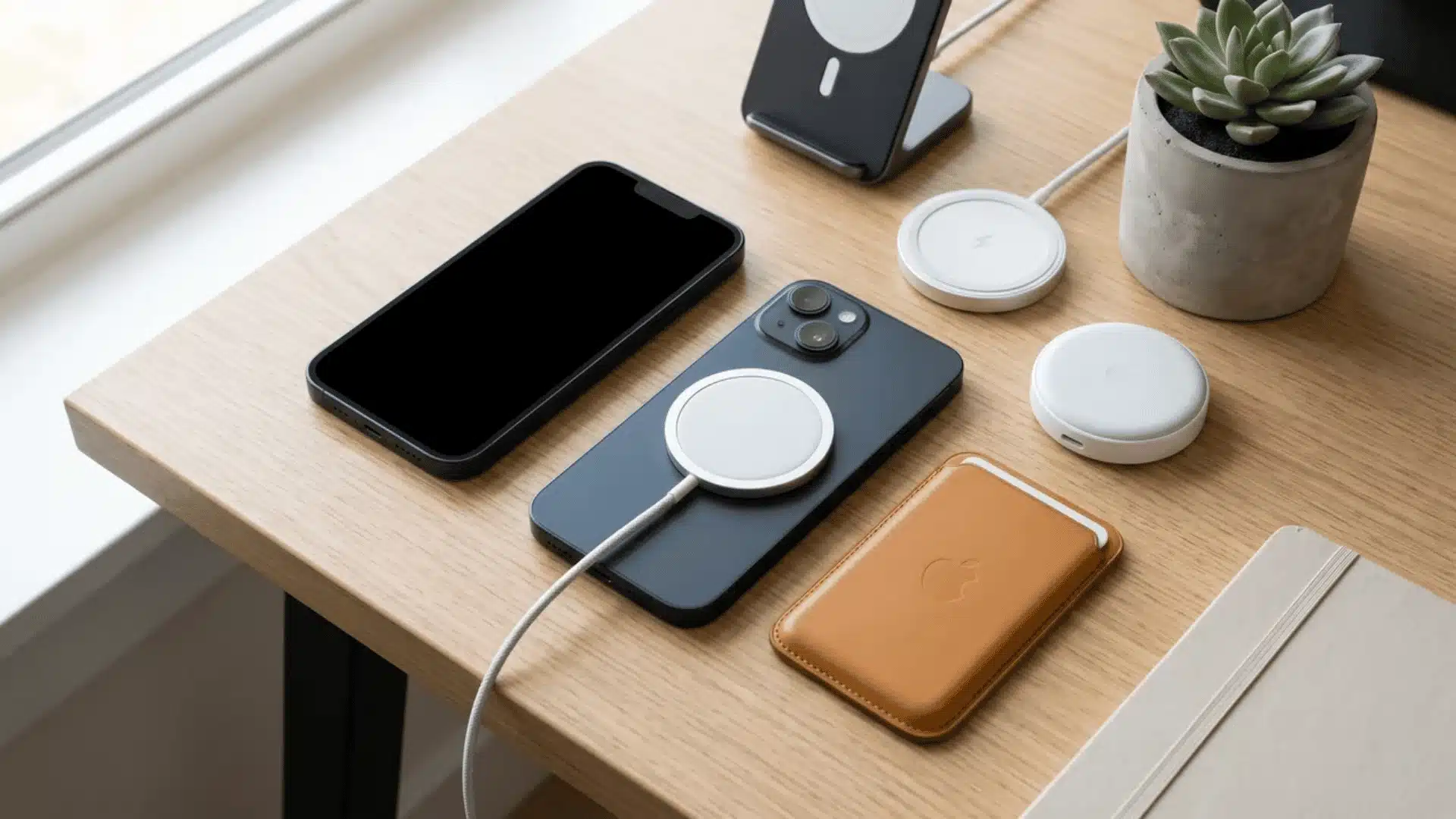


Need a quick answer before buying a charger or case? The answer is yes, but a few details are worth knowing. If you are asking, “does iPhone 14 have MagSafe,” every model in the iPhone 14 lineup supports it.
I like MagSafe because it keeps charging simple and also works with useful magnetic accessories. You can use it for wireless charging, wallets, stands, mounts, and compatible battery packs.
I also explain charging speed, case requirements, and what comes with the phone. After reading, you should know how MagSafe works on your iPhone 14, when a compatible case matters, and which accessories can work with the magnetic system.
If you’re weighing whether the phone is still worth having in the first place, a full iPhone 14 rundown covers that in more detail.
Does the iPhone 14 Have MagSafe?
Yes. Every phone in the iPhone 14 family has built-in MagSafe magnets and supports compatible MagSafe chargers and accessories.
MagSafe uses magnets arranged inside the back of the iPhone. These magnets help compatible chargers line up correctly with the charging coil.
The same magnetic system can hold accessories such as wallets, car mounts, stands, and compatible battery packs. Picking the right portable charging accessory picks makes this magnetic setup even more useful when you’re away from an outlet.
MagSafe is already part of the phone, so nothing needs to be installed or turned on before using it.
Which iPhone 14 Models Have MagSafe?
MagSafe is not limited to the Pro models. Apple included it across the complete iPhone 14 range. Here is a quick comparison.
| iPhone Model | Built-In MagSafe | MagSafe Wireless Charging |
|---|---|---|
| iPhone 14 | Yes | Up to 15W |
| iPhone 14 Plus | Yes | Up to 15W |
| iPhone 14 Pro | Yes | Up to 15W |
| iPhone 14 Pro Max | Yes | Up to 15W |
That means accessory compatibility is broadly similar across the four models, although cases and mounts still need to match the physical size of your specific iPhone.
How Does MagSafe Work on the iPhone 14?
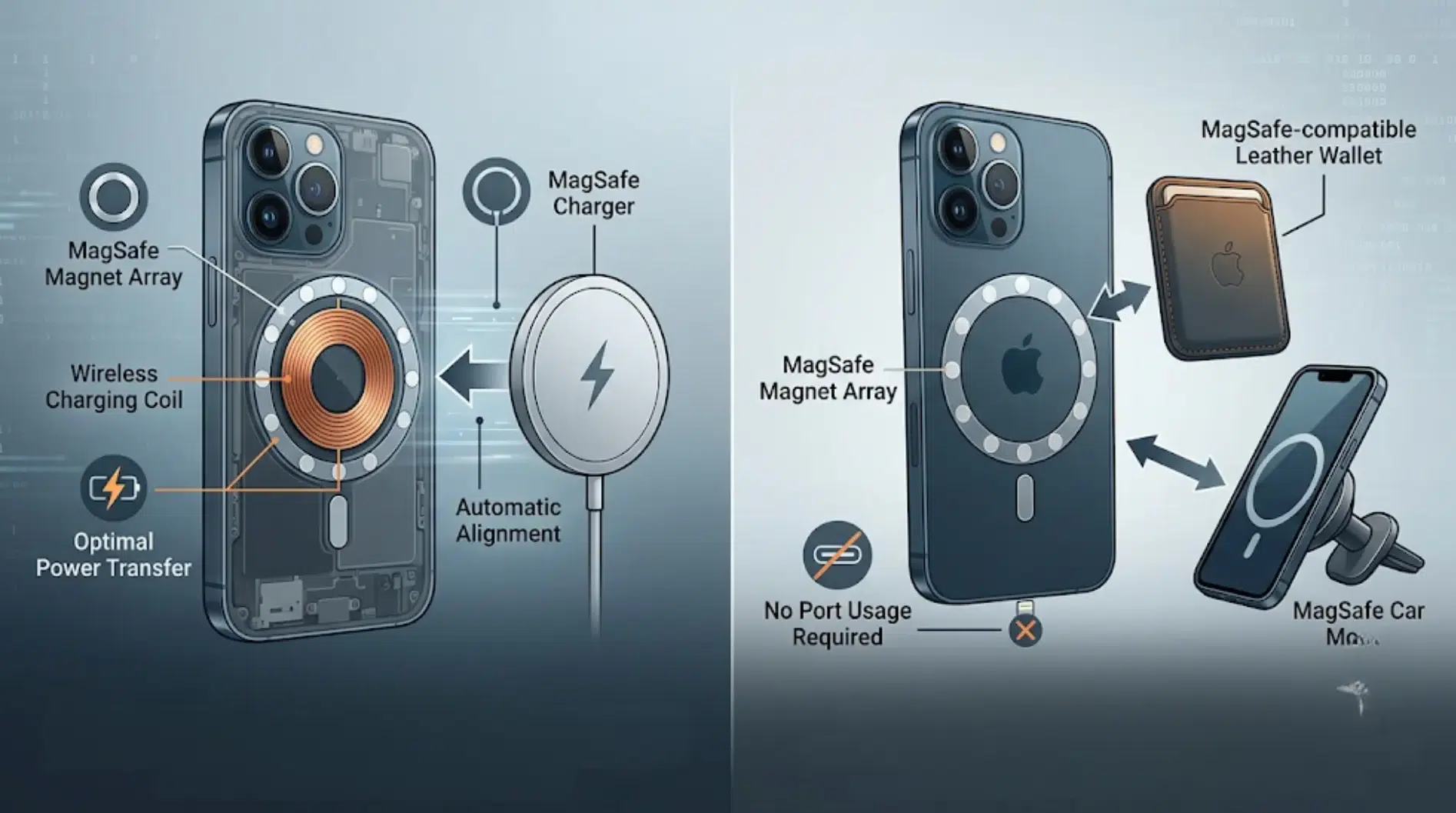
The iPhone 14 contains a ring of magnets around its wireless charging coil. A compatible MagSafe charger attaches to that area and lines itself up with the coil.
Correct alignment matters because wireless charging works best when the charger sits in the right position.
I also find the magnetic attachment useful for accessories that do not charge the phone. A wallet or car mount, for example, can attach to the same magnetic area without using the Lightning port.
MagSafe works automatically, so there is no MagSafe setting that needs to be enabled in iOS.
How Fast Does MagSafe Charge the iPhone 14?
The iPhone 14 supports MagSafe wireless charging at up to 15W when used with compatible charging equipment.
Actual charging speed can vary based on the charger, power adapter, temperature, battery level, and other conditions. A magnetic charger does not automatically mean it provides the full MagSafe charging rate.
Standard Qi wireless chargers can also charge an iPhone 14, but they may operate at a lower charging rate than a compatible MagSafe setup.
For situations where charging time is the main concern, a suitable wired charger may still be more practical.
Does the iPhone 14 Need a MagSafe Case?
No. An iPhone 14 can use MagSafe without any case attached.
The built-in magnets are located inside the phone, so a MagSafe charger can connect directly to the back.
A case changes things slightly. A MagSafe-compatible case contains magnets positioned to match the magnets in the iPhone. This helps maintain a firm connection between the phone and MagSafe accessories.
A normal case may still allow wireless charging, especially if it is thin. However, thicker cases can weaken the magnetic connection. That can make wallets, mounts, or chargers less secure. The same trial-and-error applies when building any charging setup, everyday tech accessory picks often come down to testing what actually fits your routine.
For regular MagSafe use, a case specifically marked as MagSafe compatible is generally the safer choice.
Does the iPhone 14 Come With a MagSafe Charger?
No. Having MagSafe built into the iPhone does not mean a MagSafe charging puck comes inside the box.
The phone contains the magnetic hardware needed for MagSafe, but the charger itself is a separate accessory.
That difference causes some confusion. When a product page says the iPhone 14 “supports MagSafe,” it means the phone can connect to compatible MagSafe products. It does not mean those products are included with the phone.
A MagSafe charger, stand, wallet, or mount must normally be purchased separately.
What MagSafe Accessories Work With the iPhone 14?
The magnetic system supports several types of accessories.
- MagSafe Chargers: Attach magnetically to the back of the phone for wireless charging.
- MagSafe Cases: Include properly positioned magnets so chargers and accessories remain securely attached.
- Magnetic Wallets: Attach to the back of the phone or a compatible case for carrying a few cards.
- Car Mounts: Hold the phone magnetically without a traditional clamp.
- Charging Stands: Keep the iPhone raised while providing wireless power.
- Battery Packs: Compatible magnetic battery packs can attach to the back for portable charging.
Always check the accessory description before buying. “Magnetic” and “MagSafe compatible” do not always mean exactly the same thing.
How to Use MagSafe on an iPhone 14
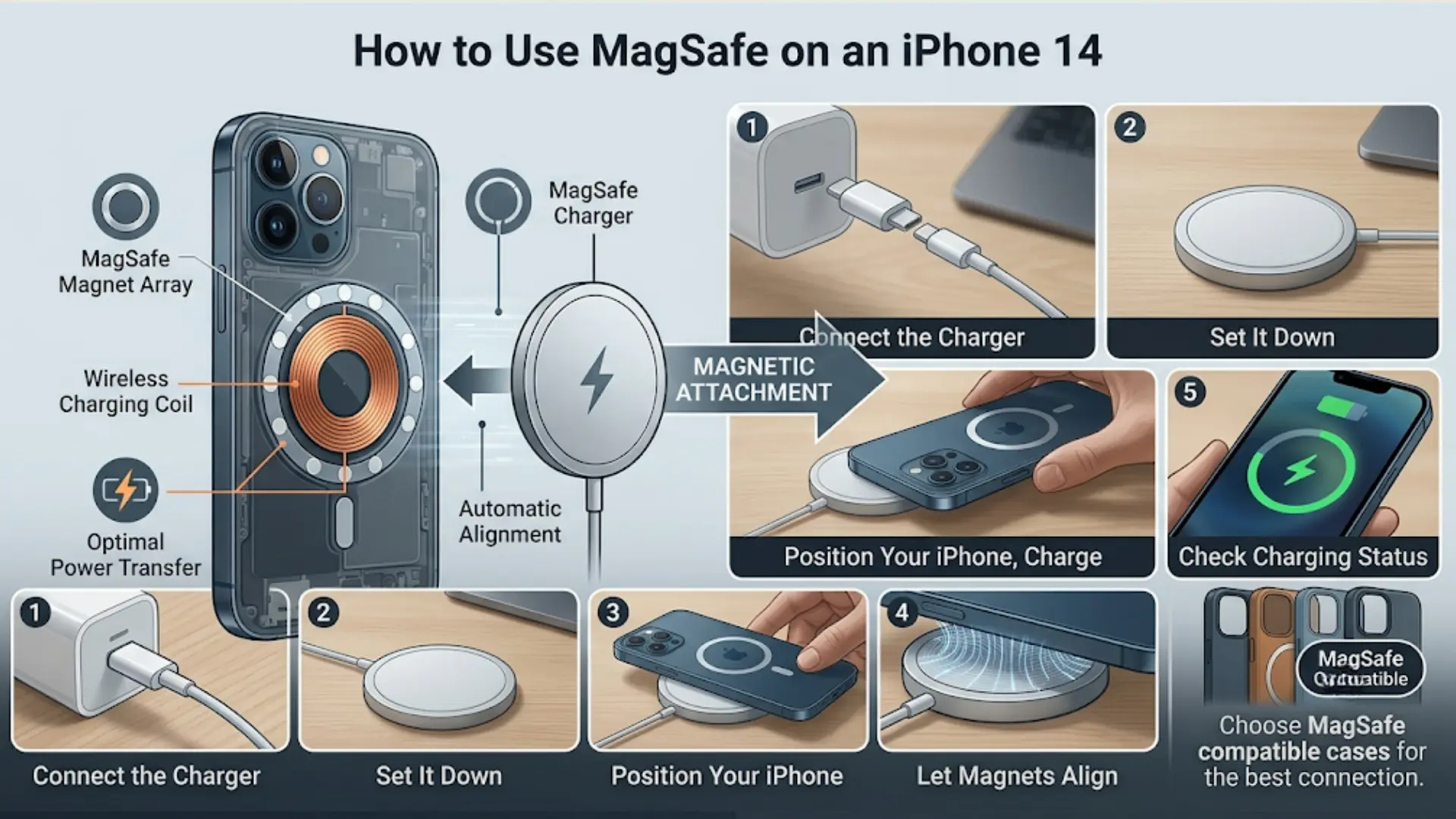
Using MagSafe on an iPhone 14 takes only a few steps. A compatible charger and power adapter are all you need to start charging.
- Connect the Charger: Plug the MagSafe charger into a compatible USB-C power adapter before placing your iPhone on it.
- Set It Down: Place the MagSafe charger on a flat, clear surface with the charging side facing upward.
- Position Your iPhone: Put the back of your iPhone 14 against the center of the MagSafe charging puck.
- Let Magnets Align: The built-in magnets automatically position the phone over the charger for a secure connection.
- Check Charging Status: Look for the charging symbol on your iPhone screen to confirm that power is being supplied.
If you use a protective case, choose one marked as MagSafe compatible. It helps maintain proper alignment and keeps the magnetic connection secure during charging.
MagSafe vs Regular Wireless Charging on iPhone 14
Both methods remove the need to plug a cable into the phone, but they work slightly differently.
| Feature | MagSafe | Standard Qi Wireless Charging |
|---|---|---|
| Magnetic alignment | Yes | Usually no |
| iPhone 14 charging rate | Up to 15W | Usually lower |
| Magnetic accessories | Yes | No |
| Automatic positioning | Yes | Manual placement |
| Works without a case | Yes | Yes |
| Compatible case recommended | Yes, when using a case | Not normally required |
MagSafe is mainly useful when secure alignment and magnetic accessories matter. Standard Qi charging remains useful when there is already a compatible wireless charging pad available.
Final Thoughts
MagSafe gives the iPhone 14 a simple way to charge wirelessly and connect useful magnetic accessories.
If you came here asking, “does iPhone 14 have MagSafe,” the answer is yes across the iPhone 14, 14 Plus, 14 Pro, and 14 Pro Max.
I think the main things to remember are the 15W charging support, built-in magnets, and the option to use the phone without a MagSafe case. A compatible case can still help keep chargers, wallets, and mounts attached more securely.
You also need to buy the MagSafe charger separately. If you use an iPhone 14, check your charger and case compatibility before buying, then share what MagSafe accessory you use most.
Frequently Asked Questions
Can MagSafe damage the battery on an iPhone 14?
Normal MagSafe charging is designed for the iPhone 14. Like other wireless charging methods, it can create some heat, so keeping the phone well ventilated while charging is helpful.
Why does my iPhone 14 get warm while using MagSafe?
Some warmth during wireless charging is normal because energy transfer produces heat. Charging may slow temporarily if the iPhone becomes too warm to protect the battery.
Can I leave my iPhone 14 on MagSafe overnight?
Yes, you can use MagSafe for overnight charging. The iPhone manages charging automatically and uses built-in battery features to reduce unnecessary time spent at a full charge.
Can MagSafe interfere with credit cards or key cards?
Magnets can affect some magnetic-stripe cards and certain sensitive items. Keep such cards away from the MagSafe charger and avoid placing them between your iPhone and charger.
Will MagSafe work if my iPhone 14 is wet?
Avoid charging an iPhone while it or the charging equipment is wet. Dry the phone and MagSafe charger properly before reconnecting them to reduce charging problems.
Why does my MagSafe charger keep disconnecting from my iPhone 14?
Poor alignment, debris, a thick case, damaged charging equipment, or excessive heat can interrupt charging. Check the connection and clean both contact areas before trying again.
Can I use MagSafe while using my iPhone 14?
Yes. You can continue using the iPhone while it charges with MagSafe. However, demanding activities such as gaming can create more heat and may reduce charging speed.